Awards Overview/Workflow
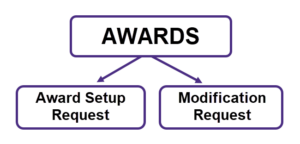
The Awards component of SAGE (System to Administer Grants Electronically) allows you to complete an online Award Setup Request after receiving a Notice of Award (NoA) from the sponsor or to complete one that OSP has started. To make changes to your existing award, you would create a Modification Request.
Award Setup Requests
The Notice of Award (NoA) from a sponsor may be sent to either campus (the Principal Investigator or Research Administrator) or the Office of Sponsored Programs (OSP).
- If you (campus) receive the NoA, whether or not OSP is included, you should create the Award Setup Request (ASR) in SAGE as soon as possible.
- If OSP receives or retrieves a new NoA and the PI is not included on the notification, OSP will create an Award Setup Request (ASR) and route it to you (campus) for completion.
- Review the FAQ: What about an Award Setup Request created by OSP? for an overview, the details on what data OSP will enter, and what data you will need to enter and review.
The system will prevent more than one Award Setup Request being created for the same eGC1.
Award Setup Requests Workflow
Video Resource: SAGE Award Setup Workflow
- Initiate an Award Setup Request (ASR) in SAGE.
- Create an award budget by composing a new budget from scratch, or by copying and adjusting your proposal budget.
-
- To create a new budget, review the Budget List and Create article.
- To make a copy of an existing budget, review the Budget Copy and Delete article.
- For additional resources, review the following:
- Videos:
-
- Link the eGC1 and SAGE Budget to the ASR.
- Complete all required fields and submit the ASR for review and processing.
- OSP and GCA review, approve, and process the ASR.
Once approved, the award appears in Workday, spending is enabled, and you receive a notification that the award is ready.
From Workday you can begin all activity on your award.
Modification Requests
There are two modification request options to choose from in SAGE Awards: Those that will route to both OSP and GCA, and those that route just to GCA.
For more information on which modification request type to use, review:
-
-
- How do I know which Modification Request type to choose? FAQ
- the UW Research Award Changes page
- Checklist: OSP & GCA Modifications in SAGE
- the Grant & Contract Accounting (GCA) Modifications page
- the Tips for Success – Award Setup and Modifications Requests in SAGE announcement
- Award Modifications in SAGE job aid
- NIH SNAP: A Detailed Guide for Modifying the Award in SAGE job aid
-
All changes that require sponsor approval, an authorized official signature, or review from the Office of Sponsored Programs (OSP), must be requested via a Modification Request (OSP & GCA) in SAGE Awards.
Modification requests that do not need OSP review can be submitted directly to Grant & Contract Accounting (GCA), also through a Modification Request (GCA only) in SAGE.
A help icon in SAGE Awards will provide guidance on which modification type to select.
Overview of Modification Workflow
-
- Create a Modification Request (MOD) in SAGE.
- Select Modification Request Type and Subcategories to identify the type of change you wish to make.
- Use the Comments & History and Supporting Attachments sections to provide more details on the necessary change.
- Add ad-hoc approvers as needed.
- Complete any additional required fields and submit the request for review and processing.
- OSP and GCA review, approve, and process the MOD.