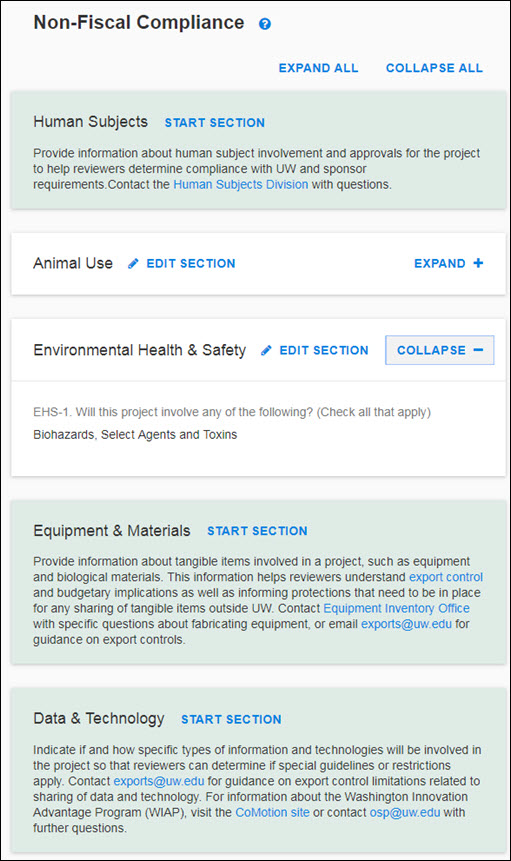
Non-Fiscal Compliance Page
NOTE: To enable improved collaboration, you can send a direct link to the PI and Reviewers
From any standard eGC1 page (excluding Grant Runner forms), the URL is now a direct link that you can copy and share with others who have access to that eGC1. This will be particularly useful when collaborating with the PI on completing the Non-Fiscal Compliance page.

Non-Fiscal Compliance Overview
Use this page to provide details related to non-fiscal compliance information. These details will:
- Identify special considerations in this application and bring them to the attention of reviewers.
- Provide information necessary for the UW approval process.
- Provide information that may help campus unit and central office approvers review your application quickly.
- Facilitate proposal review and central office review at time of award.
There are five sections on this summary page and each is covered in more detail in its own article.
- Human Subjects (questions HS-1 and HS-2, and conditionally HS-1A and HS-1B)
- Animal Use (question AU-1)
- Environmental Health & Safety (question EHS-1)
- Equipment & Materials (questions E-1 and E-2, and conditionally E-2A and E-2B)
- Data & Technology (question D-1, D-2, D-3, D-4, and conditionally D-1A, D-2A, and T-1)
Review more information and guidance on responding to the eGC1 compliance question from the Office of Research:
NOTE: If you are viewing an older application, you will see the questions you answered at that time, displayed in read-only mode and organized into the sections listed above.
On this summary page, select “Start Section” to open a section for data entry.
Once you have started a section, when you return to the summary page, you will see a link to Edit Section. In addition, an Expand + link will display on the right of the section. Select it to open the section and view the data in read-only mode. The link will change to Collapse – when the section is expanded.
This page also has Expand All and Collapse All links above the first section, on the right side of the page. Use the Expand All link to open all of the sections in read-only mode. Collapse All will close all of the sections.
In the following image, the second section, Animal Use, shows the Edit Section link. The third section, Environmental Health & Safety, shows a section in the expanded, read-only view.