Additional Organizational Unit Reviewers
The Approval Graph for an application is based on:
- The Cost Center Receiving Funding ID
- Any cost sharing Cost Center IDs
- Any additional Cost Center IDs listed on the “PI, Personnel & Organizations” page
- Any facilities or centers identified in the compliance section of the eGC1
- Cost Center for the PI and personnel listed on the eGC1
- Primary position unit’s Cost Center ID, if different from the selected unit, for the PI and personnel listed on the eGC1
Use the Additional Organizational Unit Reviewers section if this application requires the approval of any additional departments or units (not identified by the above categories) for:
- Joint Appointment Units
- TBA Personnel Units
- Space and/or Resources
- Other (for example, CoMotion)
Note: Only add those units not already represented on the approval graph.
You must add at least the Cost Center Receiving Funding on the Details page and the PI before SAGE can generate a draft approval graph. When that is done, you will see a “View draft approval graph” link below and to the right of this section. The graph will update as you add additional reviewers.
Select Look Up Cost Center (or Add another Cost Center) at the bottom left of this section to add the Cost Center Number and Name. You must then select the appropriate Approval Rule Type from the drop-down menu and add Comments.
The following image shows an example of an added organization for a joint appointment.
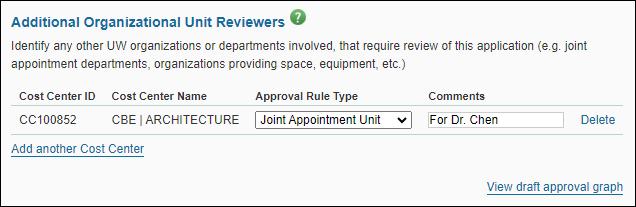
Use the Delete link to the right of the added department or unit to remove it from the list. The system will prompt you for a confirmation of the deletion.