Personnel Chooser
Use this chooser whenever you are looking up a person, across all of the SAGE Suite except for SAGE Budget, Advances, and Awards, which use a type-ahead style search.
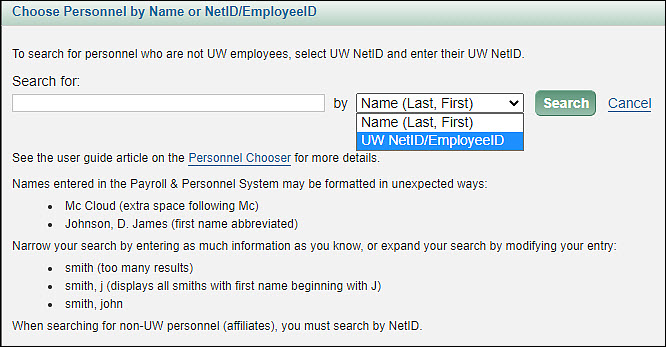
Enter an appropriate search value in the text box, select Name or UW NetID/EmployeeID from the drop-down menu, and then select the Search button. You can use the Cancel link, or the X in the upper right corner, to return to the page you were on without completing the search process. Details on all the steps are given below.
The following image shows the personnel chooser dialog.
From the results list, select the title and unit combination that is appropriate for your situation by clicking on the person’s name.
This page covers the following:
- Search by Name
- Search by UW NetID or Employee ID
- Search for Non-UW Employees
- Search Results
- Inactive UW NetIDs
- Where the Personnel Chooser Appears in SAGE
Search by Name
You must enter at least two characters when searching by name. You can enter:
- Just a last name (complete or partial), though if it’s a common name, the search may find more people than can be displayed
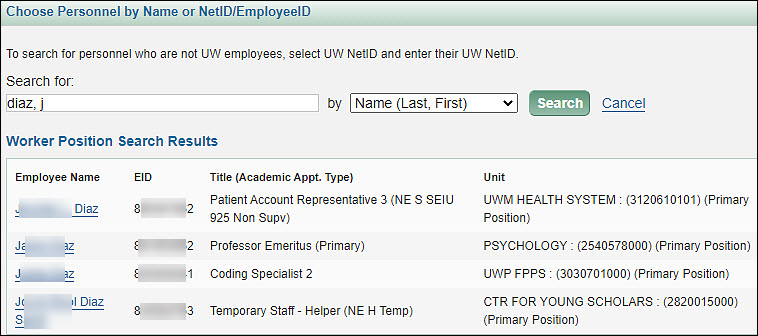
- A last name and at least the first two letters of the first name, such as: diaz, ja
Note: You need to search by “preferred name” not “legal name” to find a person. For example, if the user’s legal name is Judith Smith, but their preferred name is Judy Smith, you will need to search for “Smith, Judy” to get a result.
Search by NetID/EmployeeID
When searching by NetID or EmployeeID, you will only get a result for an exact match to what you enter. For example, if a person’s NetID is “abcd” and you search for just “abc”, you will not find the “abcd” person. Similarly, you must enter the complete EmployeeID to get a result.
Search for Non-UW Employees
If you are searching for a person who is not a UW employee, but has a NetID, you can only find them by using the NetID search. In the results, the value for EID will be “NON-UW PERSON” and the Title will be “N/A.” The department may show N/A or a name, but will not include the organization code.
Search Results
People who have more than one position or academic appointment will appear more than once on the results list.
The results list includes the following information:
- Preferred Name
- Legal Name
- EID – the Employee ID
- Title (Academic Appt. Type) – this displays the person’s academic or position title. Their academic appointment type will display in parentheses after the title. Their Primary position will also be indicated. Appointment types are described below.
- Unit – name and financial cost center associated with the position. This field will also indicate which line is the primary unit associated with the person’s primary position:
- For a paid position, the cost center for the position will display
- For a paid academic appointment linked to a paid position, the cost center for the position will display
- For an unpaid academic appointment that is not linked to a position, the cost center that displays is derived from the supervisory organization
In the example in the following image, the search was for “wang, rui”. The first three results are the same person, with a title of Professor and an Academic Appointment Type of Primary in one unit, and a second entry with the same title, but an Academic Appointment Type of Joint in a different unit. Most academic appointments are connected to a position, and therefore to a cost center. Which of the two results you choose will affect the approval graph.
The last result is for someone who is an Academic Student Employee (ASE), rather than an academic appointment. The information in parentheses following the Title indicates this.
Academic Appointment Type allows you to distinguish between multiple Appointments for the same person. Note that academics cannot have more than one “Primary” Academic Appointment at a time. The types are defined as follows:
- Primary: The person’s primary academic appointment. Every academic should have a primary appointment, so if an academic has only one appointment, that appointment will be primary.
- Dual: Used for adjunct appointments, endowment appointments, and other appointments which are secondary and are not administrative or joint, such as someone with two lecturer appointments or two clinical appointments.
- Joint: Used for secondary appointments in the Professorial track which meet the definition of a joint appointment outlined in the faculty code.
- Administrative: Used for administrative appointments such as chair, dean, chancellor, etc.
Inactive UW NetIDs
If there are individuals in the search results whose UW NetIDs are not yet active, you will not be able to select them from the list. The message “This person cannot be selected until their UW NetID is established.” will appear following their name as an explanation, as shown in the following image.

If there are no matching results for your search, the message “Sorry, no results for your search.” will display.
Where the Personnel Chooser Appears in SAGE
- eGC1s
- Add or change the PI, or add other research personnel on the PI, Personnel, & Organizations page
- Add or change the Contacts, or change the eGC1 Preparer or Budget Preparer, on the Contacts & Assign Access page
- Add personnel to the Access list section of the Contacts & Assign Access page
- Add personnel to an Advanced Search
- For Grant Runner applications, add research personnel to the RR Key Person Expanded form
- Approvals
- Add a specific person as an ad hoc approver or watcher to the approval flow
- Subawards
- Add or change the UW PI and Contacts
- Add personnel to the Manage Access page