Cost Center Chooser
Use this chooser whenever you are looking up a Cost Center across all of the SAGE Suite except for SAGE Budget, Advances, and Awards, which use a type-ahead style search.
These images show the Cost Center Receiving Funding section and the chooser window that will follow.

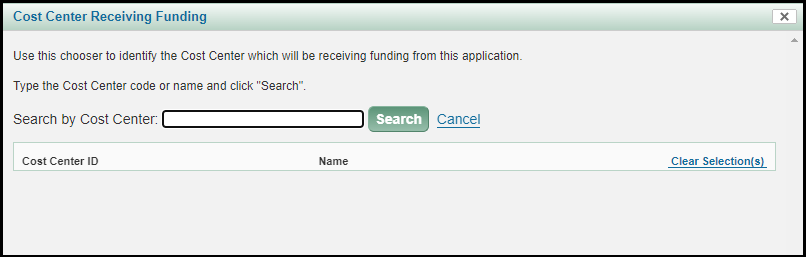
There are two ways to look up your Cost Center:
- If you know the Cost Center ID, you can enter it in the text box and select the Search button.
- Entering text found in the name of your Cost Center. Note: The system will not allow you to select a code above the department level.
You can use the Cancel link, or the X in the upper right corner, to return to the page you were on without completing the search process.
1. Search by Cost Center ID
You must enter the full alpha-numeric ID of your Cost Center when using this option.
2. Search by Cost Center Name
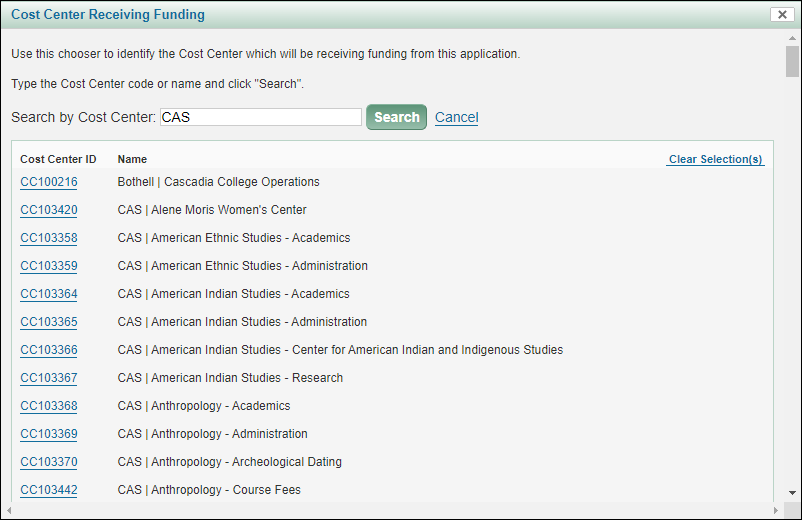
Enter text found in the name of your Cost Center. Search results will display exact matches of the text entered in alphabetical order. In the example below, the text of “CAS” was searched to list all Cost Centers for the College of Arts and Sciences. Any Cost Center ID that is at the department level or below has a link. Click the Cost Center ID link to make your selection.
To reset the hierarchy back to the initial display, use the Clear Selection(s) link.
Where the Cost Center Chooser is Used
- eGC1s
- To add or change the Cost Center on the Details page
- To add a department or unit on the PI, Personnel, & Organizations page
- To add or change the Cost Center on the Cost Sharing page
- Approvals
- To add a role with a Cost Center restriction as an ad hoc approver or watcher to the approval flow