Organization Code Chooser
Organization Codes have been replaced with Cost Centers; see Cost Center Chooser.
Use this chooser whenever you are looking up an organization code across all of the SAGE Suite except for SAGE Budget and Advances, which use a type-ahead style search.
This image shows the organization code chooser.
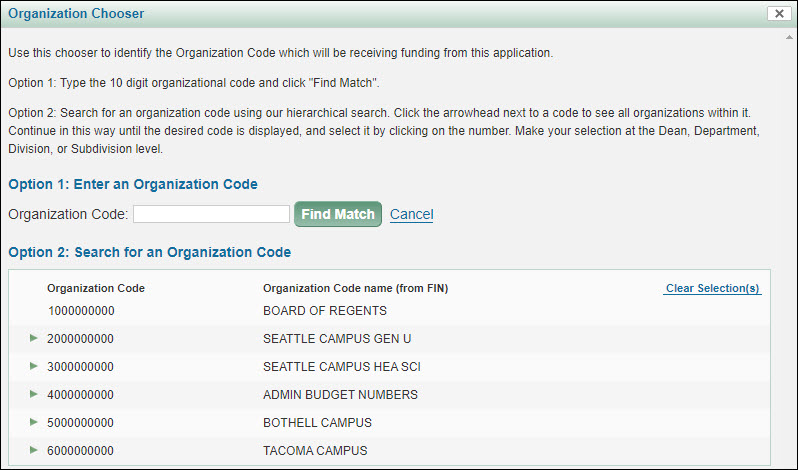
There are two ways to look up your code:
- If you know the ten-digit code, you can enter it in the text box and click the Find Match button (Option 1 section).
- You can also find your code by expanding the higher level codes listed in the Option 2 section, and working down the levels. The system will not allow you to select a code above the department level.
You can use the Cancel link, or the X in the upper right corner, to return to the page your were on without completing the search process.
Find a Match
You must enter the full ten digits when using this option.
Search for an Organization Code
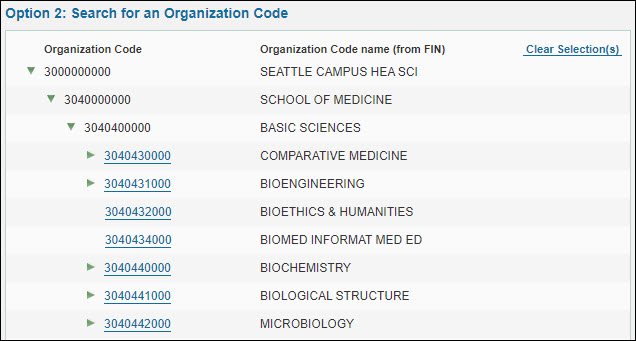
Click on the arrowheads to open the levels. In the example below, there are three levels opened to display the list of departments in the School of Medicine. Any code that is at the department level or below has a link. Click the link to make your selection.
To reset the hierarchy back to the initial display, use the Clear Selection(s) link.
Where the Organization Code Chooser is Used
- eGC1s
- Add or change the Org Code on the Details page
- Add an Organization on the PI, Personnel, & Organizations page
- Add or change the Org Code on the Cost Sharing page
- Approvals
- Add a role with an Org Code restriction as an ad hoc approver or watcher to the approval flow