Access Tab
The Access tab lists the individuals who have access to view and/or edit the budget.
Budget Preparer and Contacts
The initial Budget Preparer is the person who created the budget. The preparer could change over time.
An Administrative Contact and a Pre-Award Budget Contact are additional individuals who can edit the budget or answer questions about it.
Note: When a budget is connected to an eGC1, the contacts and preparer information will be shared, as described in SAGE Budget and eGC1 Shared Access Data. An eGC1 Preparer will display.
The following information displays for the preparer(s) and contacts.
- Name: First and last name and Employee Identification Number.
- Selected Unit: Name and organization code number of the selected business unit.
- Title
- Phone
The Access section lists all users with access to the budget, and indicates the Permission Type and Reason for the access. Read the article on SAGE Budget and eGC1 Shared Access Data if you will be linking your budget to an eGC1.
The preparer (creator) and both contacts have the permission type of Owner with the role as the reason. You cannot change or give the Owner permission type to any other users. The person designated as the PI on a budget does not have owner permission by default.
Access List
Other individuals who have access to the budget are listed in the section, in addition to the preparer(s) and contacts.
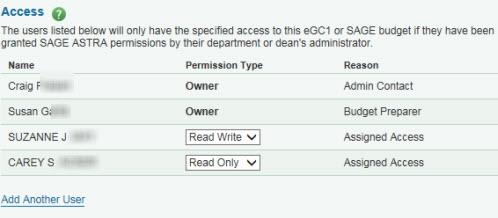
The values listed are Name, Permission Type, and Reason.
Permission types are:
- Owner for the preparer(s) and Contacts, and the PI of a connected eGC1
- Read Only for added users, which allows them to view the contents, but not make any changes.
- Read Write for added users, which allows them to view and edit the contents.
The following image shows an example list.
Access Permission on Copied Budgets
Note: When you copy a budget, the individuals on the access list of the original budget are copied to the new budget. The person who creates the copy becomes the Budget Preparer of the new (copied) budget. The Budget Preparer of the original will have Read-Only access to the copy.