Edit Auto Generated Document Text
Note: You must have the OSP Administrator ASTRA role.
Use this tool to update the content of Auto Generated Documents (AGD). Note that you cannot add or delete AGDs using this tool.
Start by selecting the document you want to edit by using the drop-down Document menu. Your choices are:
- For Applications
- Application Review
- Application Cover Letter to Sponsor
- For Funding Actions
- Notice of Award
- Request for Activation Notice – fellowships
- Research Agreement Acknowledgement
- Sponsor Document Cover Letter
- For Admin Actions
- Request for SFI Extension Information
- Sponsor Document Cover Letter
- For Subawards
- Subcaward Cover Letter
- Subaward Email Notification
- Subaward Notice to NIH
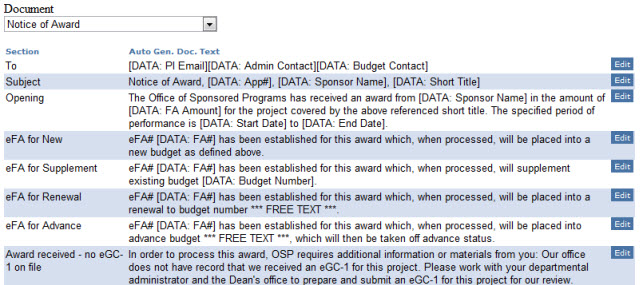
Next, click the “edit” button for the section of text you want to change.
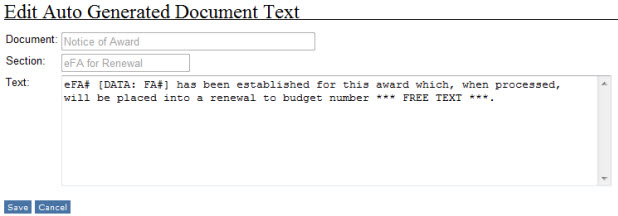
Enter your changes in the Text section. The Document and Section names display as grayed out, as these are not editable.
Note: Be sure not to change any of the text in square brackets, such as [DATA: FA#] or in angle brackets, such as <br> in the Application Sponsor Cover Letter.
Click “Save” to save the changes, or “Cancel” to return to the list.