Open and Modify Items
Regardless of the view, you can perform four actions on most items in a Cycle from the Cycle Detail page.
Exceptions: you cannot reassign, add a child or change the parent of an Advance Budget Request.
The following image shows the location of the links. Open is to the left of the item. Reassign, Add Child, and Change Parent are to the right.
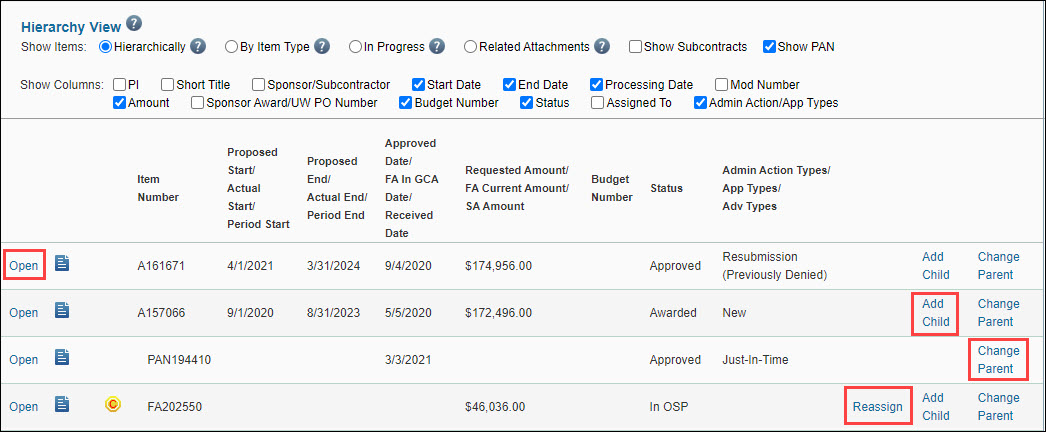
To open an item from the Cycle
- From the Cycle Detail page in the list of items under Hierarchy View, select Open to the left of the item you want to view.
If you do not see the item you want to open in the list, try modifying the options selected under Show Items.
Tip: When you open an item, SPAERC displays it in a new browser window. If you open a second item of the same type, SPAERC will replace the display of the first item with the second item in the same window. In other words, while you may have multiple windows of various item types open, it is not possible to open multiple windows of the same item type.
Note: You can open Advance Budget Number Requests (ADVs), but you cannot edit them. ADVs open in the SAGE Interface, not SPAERC. Because an ADV opens in a new window, you can return to the Cycle Details at any time.
To reassign an item to a different person or location
Note: You cannot reassign actions with a status of In GCA or Processed, applications with a status of Awarded, and any item assigned to File. In these cases the Reassign link does not display.
- From the Cycle Detail page in the list of items under Hierarchy View, click Reassign next to the item you want to reassign.
- In the Reassign window that opens, select a value for Assign to from the drop-down menu. You can add a note, if you want.
Click Assign. The window will close, and the Cycle Details page will refresh, displaying the new assignment(s).
To add a child to an item
When you create a Funding Action or Admin Action directly from an application, the system automatically makes the action a child of the application and adds it to the application’s Cycle.
Note: A PAC cannot have a child item.
- From the Cycle Detail page in the list of items under Hierarchy View, click Add Child next to the item you want to reassign.
- In the Specify a Relationship Window, select the type of item you want to add as a child to the item. For an application, you can choose another application, a Funding Action, or an Admin Action.
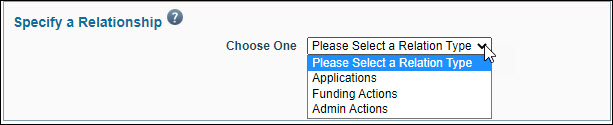
- In the Search window that displays, specify the criteria to locate the item you want to add as a child, and then click Search.
- From the list of items returned, select the correct item and click Add To Cycle. This will close the selection window and return you to the Cycle Details page.
Note: If the item you want to add is already in a different Cycle, or has a parent already, then the system will prompt you to confirm that you want to overwrite the existing relationship.
To change the Parent of an Item
Similar to adding a child to an existing item, you may need to change the parent of an existing Cycle item. The new parent may be an item within the current Cycle, or elsewhere.
Note: PACs can only have an FA as parent, and FAs can only have an application as parent.
- From the Cycle Detail page in the list of items under Hierarchy View, click Change Parent next to the item you want to reparent.
- From the Relationship Window that opens, select the type of item you want as the new parent of the item. This will bring up the Search options.
- Once you have searched for the Item you want to be the new Parent, click Make Parent. The system will prompt you to confirm overwriting the relationship. You may also see a prompt to adopt fields from the new parent (e.g., Principal Investigator).

Note: changing the parent on the item will require you to confirm the change in relationship. The change of parent may also result in a change of cycle dependent on the new parent/child relationship. The new cycle details will appear in your browser when this happens.