Adobe Submission Status
After you submit an application to the NIH which uses an Adobe form set, you can have the system automatically update the submission status information. This information displays in both SPAERC and SAGE.
To request the status updates, your application must
- have a status of In OSP
- have a post-submission Grants.gov tracking number
To start the process:
- Open and unlock the application
- Click on the Status tab
- Enter the complete tracking number (GRANT plus all digits) in the text box.
- Click the “Receive Adobe Status Updates” button to start the process.
Information about the submission status will display on the application’s Status page and the History & Comments page.
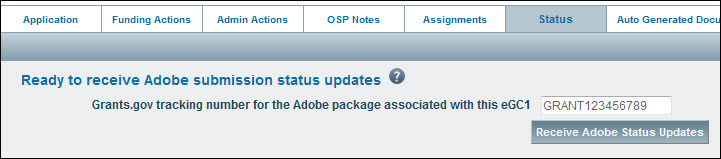
Status updates will begin to flow through to SPAERC within 10 minutes. SPAERC users can edit the Grants.Gov tracking ID while the application is still in “In OSP” status. Once you approve the application, you can no longer edit the tracking ID. If you need to change the tracking ID of an approved application, contact the SAGE Help Desk.
Receiving the status updates will also cause the Adobe Submission icon to appear on the tasklist for the application.