Automatically Upgraded Legacy Budgets
SAGE fully upgraded existing legacy budgets to the current budget format on January 28, 2022, with a few exceptions. This article describes
- Fully Upgraded Budgets
- Upgraded Budgets with Some Revised Calculations
- Budgets that Could Not be Upgraded
Fully Upgraded Budgets
You can identify these upgraded budgets on your budget list by the “UPGRADED” chip following the title of the budget. If you hover your mouse over the chip, the text reads “This budget was automatically upgraded from the legacy format.” The following image shows an example of this.
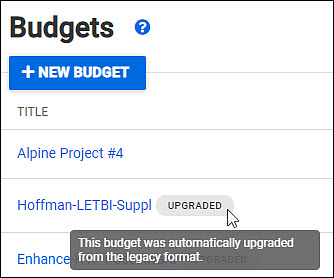
When you open the budget, you will see a banner displaying the same “automatically upgraded” message at the top of the Budget Summary, as shown below.

Upgraded Budgets with Some Revised Calculations
If your budget included APL (Applied Physics Lab), Fixed Fee, or Sea Pay costs, you were not previously able to manually upgrade it due to some incorrect calculations. On the automatically upgraded version of these budgets, the calculations have been corrected, so the totals will differ from the legacy version.
In these cases, an “alert” version of the banner will display. The alert text will indicate which of your budget costs needed to be corrected: APL, Sea Pay, or APL and Sea Pay.
The following image shows an example alert for a budget with APL costs.

These are the four incorrect calculation cases:
-
- Legacy Budgets with APL/PDC (pro-rated direct costs) that included a subaward
- PDC should have been charged against the first $25,000 of a subaward worksheet or subaward line 03-62.
- Legacy Budgets with APL that included Sea Pay
- Sea Pay benefits on APL budgets were incorrectly calculated using APL benefits AND APL Leave Benefits. The correct calculation for Sea Pay benefits is to use the APL hourly rate (01-86).
- Legacy Budget with APL costs in 19-00 or 19-20
- Costs from 19-00 and 19-20 should not have been used for proposal budgets and are no longer allowed in current budgets.
- Legacy budgets with APL and Fixed Fee on both the parent budget and a sub-budget
- The sub-budget fixed fee amount was not included in the total budget’s fixed fee.
- Legacy Budgets with APL/PDC (pro-rated direct costs) that included a subaward
Budgets that Could Not be Upgraded
There were a very few budgets that could not be upgraded for various reasons. To provide access to the data for these budgets, a download icon and “legacy” chip will appear on your budget list, as shown below.

Clicking the budget title or download icon will create an export to Excel in the legacy format.