Reviewer Details
This page displays when you click on an Approval Flow (Graphical) node, or select View Reviewers on the Approval Flow (Text).
The Application Details section lists selected fields from the eGC1. The data fields include:
- Application Number
- Full Application Title
- PI Name
- Org Code Receiving Funding
- Sponsor Deadline
- OSP Due Date
- Ready To Submit value
The Reviewer Details section includes the following fields:
- Role: The role for this person or unit on the approval flow, for example, “Department Reviewer, Radiology”.
- Reason: The reason(s) that the person or role appears on the approval flow. Reasons include personnel, org code receiving funding, an answer to a compliance question, and other factors.
- Status: The status for this person or role if it has not yet approved, or the name of the person who has approved.
The Authorized Reviewers for the Application section lists each person who is an approver or watcher for this unit. The information listed includes:
- UW NetID
- Name
- Email address
- Telephone number
A link to Directory Info also displays.
Note: If the details you displayed are for the Preparer/Owner watcher role, this section is titled Owners/Preparers for this Application.
After a person or role approves the application, you will see links to the approved version of the eGC1, its attachments, and its connected budget (if there is one). SAGE captures the state of the eGC1 at the time each approval occurs. You can then compare this information to determine if any changes happened during routing.
Click the View Approved eGC1 link to see the approved version of the eGC1 for this Approver.
The following image shows an example of this section.
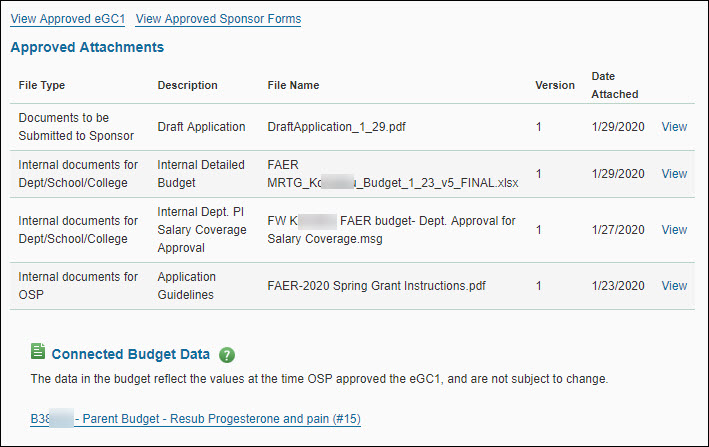
To see the contents of the Grant Runner forms on the eGC1 for a specific approval, click the View Approved Sponsor Forms link. Note: this link appears even if the eGC1 is not a Grant Runner one.
For each Approved Attachment, the following fields display:
- File Type: The Attached Documents page section that contains the file.
- Description: The description entered for the attachment.
- File Name: The name of the file on the originating computer or server.
- Version: The version number of the document. SAGE automatically assigns “1” to the initial document. When you update the document, the system increments the version number.
- Date Attached: The date and time the document was attached.
- View: this link opens the attachment for review.
If the application is connected to a budget, the Connected Budget Data section displays a link to the budget data.