Approval Flow : Approval Status Data
Status Data
This initial section explains your relationship to this application.
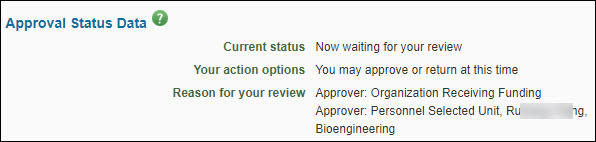
| Field | Description |
|---|---|
| Current Status | This approval status is based on you or your role and the current routing status of the eGC1. |
| Your action options | Based on your status with this eGC1, this field displays what actions you may take. |
| Reason for your review | This is the reason(s) you or your organization needs to approve this eGC1. |
Approval Options
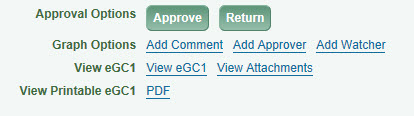
Approvers (other than the PI) can only approve an eGC1 which is in Routing status. If you do not see the Approve or Return buttons, check the eGC1s status on the My Approvals page. The PI can approve an eGC1 in Composing status by completing it, or in Routing status by using the Approve button.
- Use the Approve button to indicate your approval of this application. You can optionally include a note which will display on the History & Comments page.
- Use the Return button to return the application for modification; the PI and owners will be notified by email of the return, and the email will include your return comments. Comments are required and will display on the History & Comments page.
Graph Options
Use the Add Comment link to include a note, independent of your approval, which will display on the History & Comments page.
Use the Add Approver or Add Watcher link to include an additional approver or watcher in the approval flow. See the Add An Ad Hoc Reviewer article for the steps to do this.
View eGC1 Options
The View eGC1 link opens the application in a new window, in a read-only mode. This allows you to review the details of the application.
The View Attachments link opens a new window and displays a list of all the attachments for this eGC1.
View Printable eGC1
The PDF link opens a new window that displays a printer-friendly copy of the entire application.