Basic Cycle Data
Basic Cycle Data
This data includes information common to the competing segment or project.
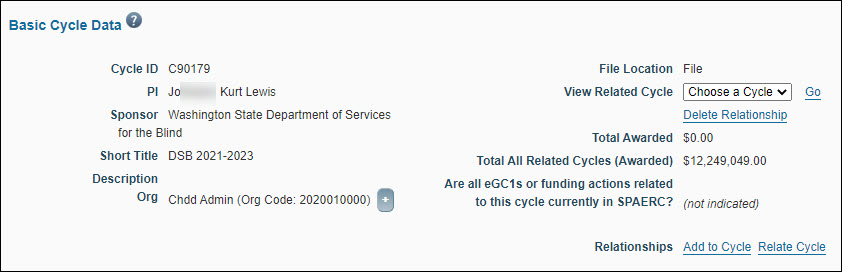
| Field | Description |
|---|---|
| Cycle ID | Assigned by the system, unique to each Cycle |
| PI | The PI responsible for this Cycle of research, copied from the first item added to this cycle |
| Sponsor | The funding sponsor for this Cycle of research, copied from the first item added to this cycle |
| Description | Enter a brief description of the Cycle |
| File Location | This is always File (prior to November 2013, the location may be different) |
| Related Cycles | If one or more cycles are related to the Cycle you are viewing, a drop-down appears that allows you to change which cycle you’re viewing. To disassociate the two cycles, click Delete Relationship. |
| Total Awarded | Displays the total Awarded amount from the Funding Actions in this Cycle with a status of Processed |
| Total All Related Cycles (Awarded) | Displays the total awarded amount from all Funding Actions in this and Related Cycles (if any) with a status of Processed |
| Are all eGC1s or funding actions related to this cycle currently in SPAERC? | Answer no if there are paper documents associated with this cycle that pre-date the eGC1s and funding actions |
| Relationships | Use the Add to Cycle link to add items as children of the cycle (see Add Items to Cycles); To associate one cycle with another, click Relate Cycle (see Relating Cycles) |
Lock, Save, and Close Cycles
- To lock the Cycle Detail Page, click the lock icon
 . This makes the Basic Cycle Data read-only. When you lock the Cycle, the system saves any changes you have made.
 - To save changes and continue editing, click the Save icon
 .
. - To close the cycle and return to the last Tasklist viewed, you can click either the Save & Close this Cycle tab or Back to SPAERC Tasklist. Both of these actions will save any changes you have made.

Edit Cycle Data Fields
You can edit the PI, sponsor, short title, and description fields from Basic Cycle Data. This does not affect the Items in the cycle; their original values will remain unchanged.
Note: You do not need to unlock the Cycle to make changes to cycle relationships and Item relationships.