Awards Holds
OSP and GCA can apply and remove holds from an Award Setup Request or a Modification Request.
A hold can be placed for a variety of reasons and applied when the Award Setup Request or the Modification Request is in any of the following statuses:
- OSP Setup
- OSP Assigned
- Returned
- GCA Assigned
- GCA Workday setup
Types of Holds
The following manual holds and compliance checks may be applied to your Award Setup Request or Modification Request:
- General Hold
- Export Control Hold
- IACUC Approval Hold
- IRB Approval Hold
- Campus Input Required
- Sponsor Input Required
- GCA/OSP Coordination Required
Knowing a Hold has been Placed
On the Award Request List
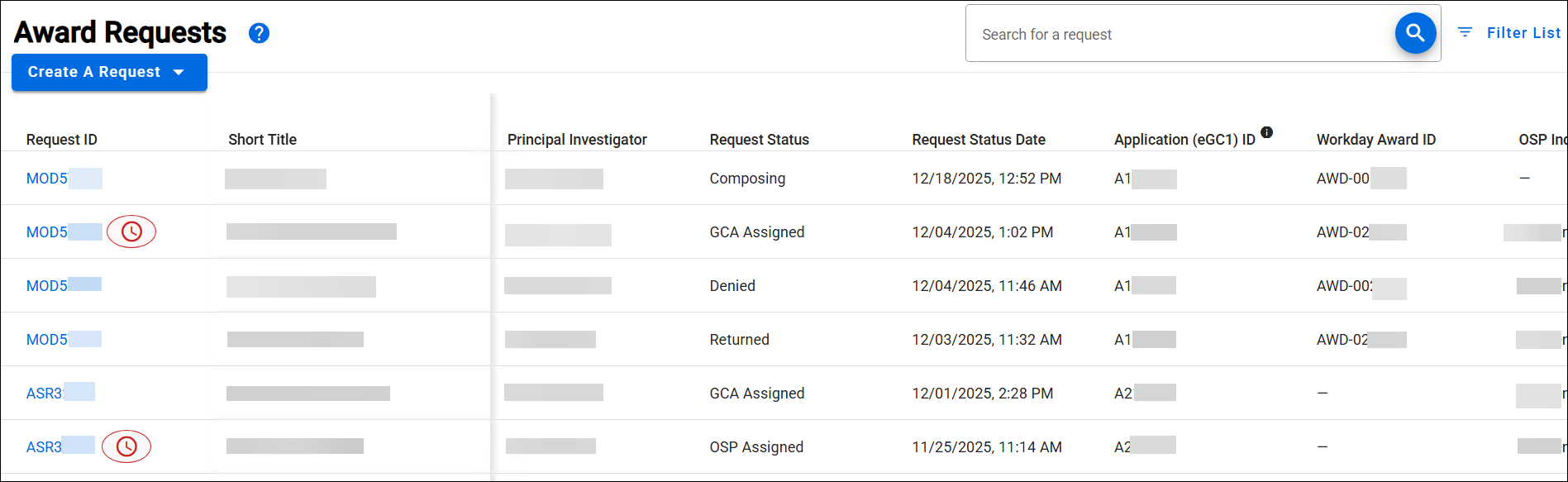
If a hold is applied to the Award Setup Request or Modification Request, a hold indicator icon will display to the right of the Request ID.
The following image shows an example of an added hold on the Award Request List:
In the Request
Once a Hold is applied to the Award Setup Request or Modification Request, near the top of the page, the following text will display in a blue font color (on all pages):
“Holds or compliance checks are in process. View the Comments & History section for more information.”
Note: There is no campus email notification when a hold is placed or removed on an ASR or MOD.
The following image shows an example of this text:

In Comments & History
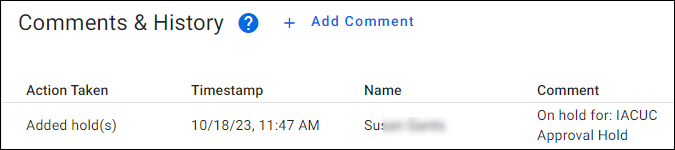
More detailed information is displayed in the Comments & History section of the Award Setup Request or a Modification Request.
The following image shows an example of an added hold: