Event History & Comments
You can view changes to the subaward and its subaward requests in this section.
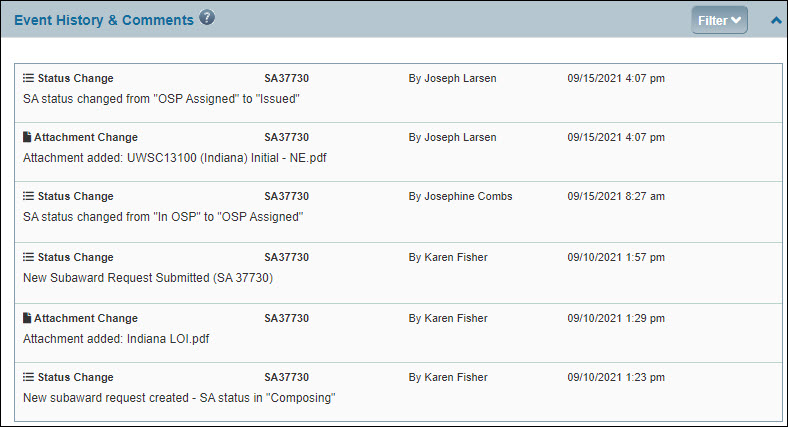
When viewing the Subaward Overview page, you’ll see an All Event History & Comments section which will show changes for the subaward and its subaward requests.
When viewing a Request Details page, you will see an Event History & Comments section that only shows events related to that specific request.
The section is an accordion which initially displays in collapsed mode. You can expand it by selecting the V-shaped “chevron” at the far right of the section title. Clicking the rotated chevron will collapse the section.
When expanded, you can select Filter to display the filtering options. For the Event Type filter, all of the check boxes are unselected by default, so all types display. To limit the list to just one or more types, select those check boxes.
- Status Change – displays all status changes with their associated comments
- OSP Notes – displays all related OSP Notes; this information displays only in SPAERC
- Comments – displays the comments from OSP, when they returen a request, and from campus, when they resubmit the returned request.
- Assignment Change – displays changes to the OSP Assigned To value
- Contact Change – displays changes to the UW or Subrecipient contacts; only appears in the “All” events section on the Overview page
- Attachment Change – displays added, updated and deleted files
When on the Overview page, you can also select a specific request from the Request ID drop-down menu to limit the events list to changes for just that item.
For each event or comment, the information shown includes
- Event Type, such as Status Change
- Subaward number (SC) or Subaward Request number (SA)
- Person who made the change
- Date and time of the change
- System generated description of the change
- Comments from OSP and campus about a returned and resubmitted request