Create an Admin Action
You can create an admin action in three ways:
The best way to create an Admin Action is from a parent item. When you create an Admin Action from a parent item, the system automatically populates some fields with details from the parent item. An Application, Cycle, or Funding Action might be the parent of an Admin Action.
In rare situations, you may need to create an Admin Action without a parent. For example, OSP may receive notification of funding before the research team has submitted an eGC1. In this case, you can create an Admin Action, convert it to a Funding Action, and then make the FA a child of the application as soon as the eGC1 is complete and In OSP.
To create an Admin Action from the Tasklist of a Parent Item
- Click the appropriate tab for the parent item. For example, if the parent is an application, click the Applications tab.
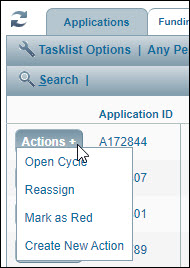
- Locate the parent item on the tasklist, and click the Actions + button located in the right-most tasklist column.
- In the button’s drop-down menu, select Create New Action.
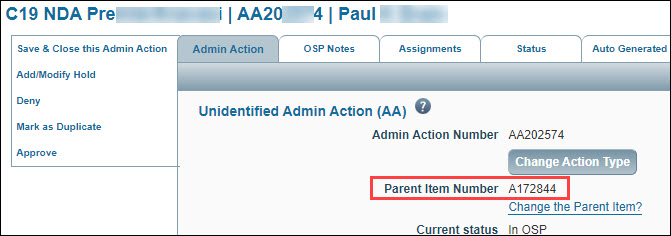
The new Unidentified Admin Action will display. The system will assigned it a unique number with a prefix of AA and the action will inherit basic project details from its parent.
To create an Admin Action from within the Parent Item
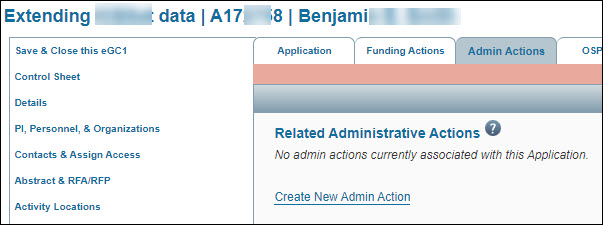
If you have already opened the parent Application or Funding Action, select the Admin Actions tab, and click the Create New Admin Action link to create a new unidentified Admin Action.
To create an Admin Action from the Administration Tab
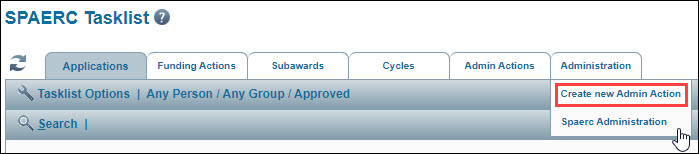
Hover over the Administration tab, and select Create new Admin Action from the drop-down menu.
After you create the Admin Action, you can look up and select a parent for it. If the parent is:
- A new cycle, the system will copy the project details from the Admin Action to the cycle.
- An existing cycle, the cycle’s data values for Short Title, Sponsor, Org Receiving Funding, and Sponsor Award Number will replace those of the action. The PI specified on the Admin Action will not change.
- An existing eGC1, the project details from the eGC1 will replace those of the Admin Action.
- An existing Funding Action, the system will copy project details from the FA to the Admin Action.