Human Subjects Division
How to Register a Clinical Trial on ClinicalTrials.gov
Contents
The Protocol Registration and Results System (PRS)
Clinical trials are registered on the ClinicalTrials.gov site through a web-based data entry system called the Protocol Registration and Results System (PRS). Some terms used in relation to accounts in the PRS include:
- Organizational account. An organization (e.g., the UW) has a single PRS organizational account. The UW account is called UWashington.
- Organization account manager. The UWashington account is managed by HSD’s Regulatory Affairs team.
- Individual user accounts. Researchers or their staff must set up user accounts through the organization account. An individual’s user account may be used for more than one clinical trial.
Who Can Use The UW PRS Organizational account
Any UW faculty, staff or student who is eligible to use the UW IRB for review of their studies may use the UW account to register clinical trials in which the UW is engaged in the research, even for trials that were reviewed by a non-UW IRB instead of the UW IRB.
Creating a User Account
To create your user account, following the instructions outlined in the SOP Creating a CT.gov User Account. Requests for a new user account are usually completed within 2 business days once the Regulatory Affairs team receives the request.
General Help Documents to Get Started in the PRS
To assist researchers, HSD has linked to CT.gov Quick Overview Guides from the PRS site.
- PRS Quick Overview Guides
- PRS User’s Guide: 28-pages of step-by-step instructions for how to use PRS
PRS Roles and Responsibilities
General information on different PRS roles and responsibilities can be found in section 3.1 of the PRS User’s Guide. The following provides UW-specific information:
Sponsor (or Sponsor Organization) – The UW is a Sponsor Organization; it is listed in the PRS system as UWashington.
Administrator – HSD’s Regulatory Affairs team serves as the Administrator for the UWashington account. Contact them through hsdreprt@uw.edu.
Responsible Party – The UW PI should be identified as the Responsible Party for studies reviewed by HSD. For studies managed under the Fred Hutch/UW Cancer Consortium, a PI who initiates or conducts an investigator-initiated clinical trial is designated as the Responsible Party, but the Responsible Party for other types of interventional trials is usually the Sponsor.
Registering a Trial
HSD reviews all incoming IRB applications and certain study modifications to determine whether the study is required to register and report results on CT.gov. The Regulatory Affairs staff at HSD will send an email to the study team if the trial meets these requirements and outline the steps for completing registration.
If the study is required to register in PRS, Regulatory Affairs staff will initiate the trial registration for the PI in PRS. The PI will need to complete the registration in PRS no later than 21 days after enrollment of the first study participant or within 1 year of IRB approval (HSD Policy), whichever occurs first. Registration is completed when a National Clinical Trial (NCT) number has been assigned to the study record.
Generally, each IRB application will have its own PRS study registration. However, contact HSD at hsdreprt@uw.edu regarding unique situations that may require more than one study registration for a study (e.g., NIH requests two separate registrations). Include ‘CT.gov’ in the subject line of your email to help triage your message efficiently.
Registration Data Entry
After receiving the email from the Regulatory Affairs staff regarding initiation of trial registration, log into the PRS system to enter data and complete registration. Information is entered by the study team in the trial record by completing a series of topic-specific sections (called modules) in the ‘Protocol Section’ located on the ‘Record Summary’ page.
The following documents and links provide guidance and instructions on how to enter data into the modules:
- WORKSHEET Clinical Trial Registration was prepared by HSD for researchers. It lists the protocol modules and the specific data elements in each module. This allows the record creator to see in advance what specific information will be required, before going into the PRS system.
Additional resources from CT.gov:
- CT.gov PRS Guided Tutorials
- Review section “Registration Tutorials” which describes how to enter data in each individual module.
- CT.gov PRS User Guide
- PRS Protocol Registration Data Element Definitions. This PRS webpage provides definitions for each of the protocol registration data elements and indicates whether each element is required.
- PRS Review Criteria for Registration describes the criteria used by the PRS system to assess completeness and consistency of results reporting.
Helpful Tips
- Smart forms. The PRS data entry forms are “smart”. This means that some fields will appear (or not) depending upon your answers to other questions.
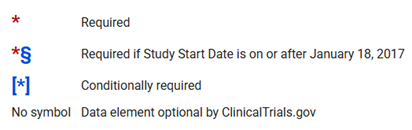
- Optional elements. A symbol, as described in the PRS Protocol Registration Data Element Definitions, and shown below, indicates whether each data element is optional or required.
- Special characters, formatting tips. See 4.2 Data Entry Tips in the PRS User’s Guide for help on formatting and using special character information (e.g., example: ≤ or ±).
- One or multiple sessions. You do not need to complete the registration in one sitting. Use the save option at the bottom of the section where you are entering information before navigating away. When ready, log back in and return to any remaining sections to complete the registration.
- Downloading a copy of the record. Section 5.1 of the PRS User’s Guide describes how to download an RTF file of your record. This can then be imported into Microsoft Word (or another word processing program) – which is very useful for editing and sharing a record with co-workers.
- HIGHLY RECOMMENDED: Review what you have entered before you submit the record. Section 5.1 of the PRS User’s Guide describes several different ways to check your record. The PRS Protocol Review Criteria document is also useful.
Resolving Problems
Section 8 of the PRS User’s Guide describes how to identify and resolve records with problems.
For specific questions related to data entry or registration issues for your specific trial, we recommend contacting register@clinicaltrials.gov for assistance.
For general questions, contact HSD at hsdreprt@uw.edu for assistance. Include ‘CT.gov’ in the subject line of your email to help triage your message efficiently.
For assistance with studies managed by the Cancer Consortium’s Clinical Research Support (CRS) Office, contact CRS at CTgov@fredhutch.org. More information can also be found on the CRS webpage.