Indicate SFI
As you are completing your disclosure, you will see one of three versions of the Disclose Significant Financial Interests page. Which version you see depends on whether you have previously disclosed any SFI and whether your sponsor (or originating sponsor) is a one that requires UW review of SFI.
The Disclose Significant Financial Interests page appears when you select Complete Disclosure or Create New Disclosure in the Action Items section and then select an eGC1 or CoMotion/IRB activity.
No Existing SFI
If you have not yet entered any SFI, you will need to indicate whether you have any SFI to disclose. The following image shows the question.
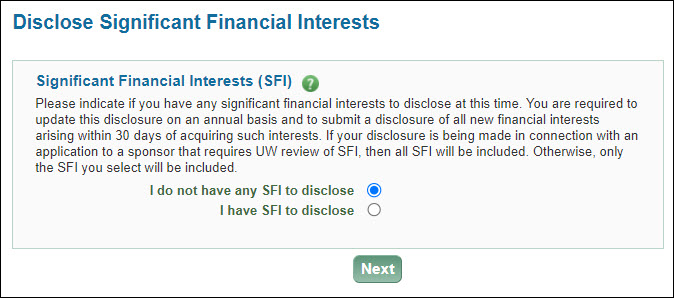
- If you do not have any SFI to disclose, just click Next to complete your disclosure.
- If you do have SFI to disclose, when you click on Next, the SFI Entry page will display for you to fill in your information.
Existing SFI – Sponsor not requiring UW review of SFI
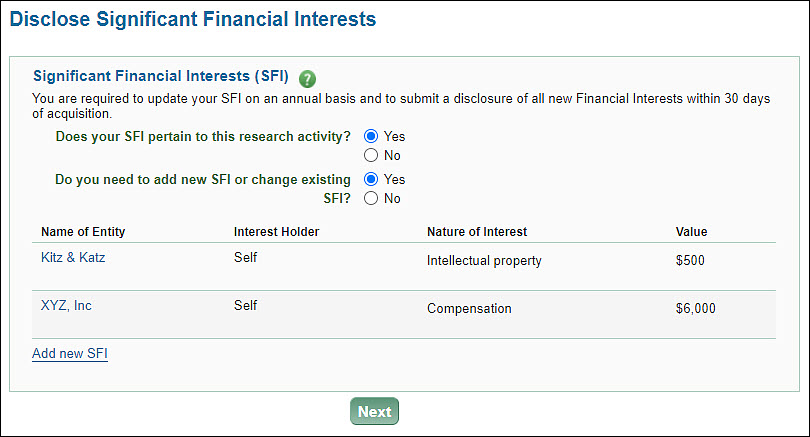
If you have existing SFI and your sponsor is one that does not require UW review of SFI, you must answer the question: Does your SFI pertain to this research activity?
- If you select No, then click Next, you will complete the disclosure. The disclosure will not include any of your existing SFI.
- If you select Yes, an additional question displays: Do you need to add new SFI or change existing SFI?

For this question, select No or Yes.
- Selecting No displays the Next button so you can continue.
- Selecting Yes displays a list of your current SFI, if any. You can then Add new SFI or click on the Entity Name of an existing SFI to edit it. When finished, click Next to continue.
Existing SFI – Sponsor requires UW review of SFI
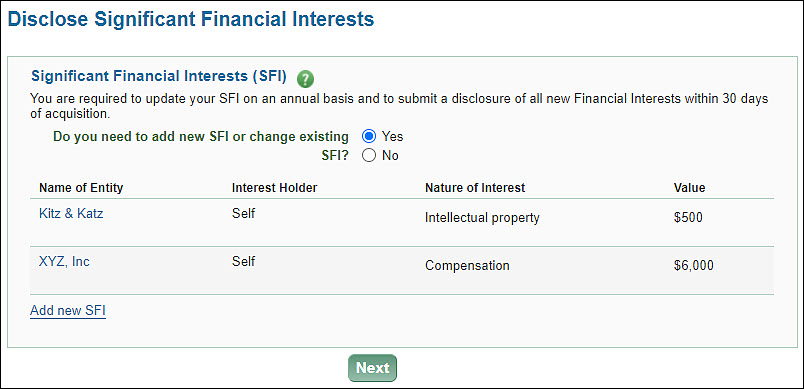
A disclosure for a sponsor or originating sponsor that require UW review of SFI will automatically includes all of your existing SFI. So in this case, you just need to indicate if you want to add new or update existing SFI.

- If you select No and click Next, you will complete the disclosure.
- If you select Yes, then the list of your existing SFI will display, allowing you to edit any existing SFI or add new ones. The following images shows an example of existing SFI.