Enter Other Activity
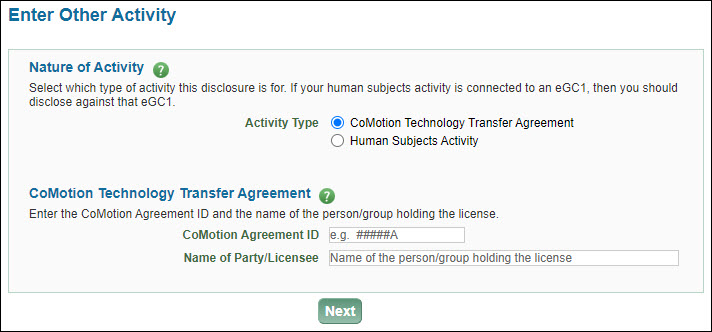
The Enter Other Activity page displays when you select “I need to make a disclosure for a CoMotion tech transfer agreement or IRB approval.” on the Disclosure Type page and click Next.
Select either CoMotion Technology Transfer Agreement or Human Subjects Activity.
CoMotion
If you select CoMotion Technology Transfer Agreement, an agreement section will display.
- Type in the CoMotion Agreement ID and the name of the person or group holding the license.
- Click Next.
The following image shows the CoMotion fields.
Human Subjects
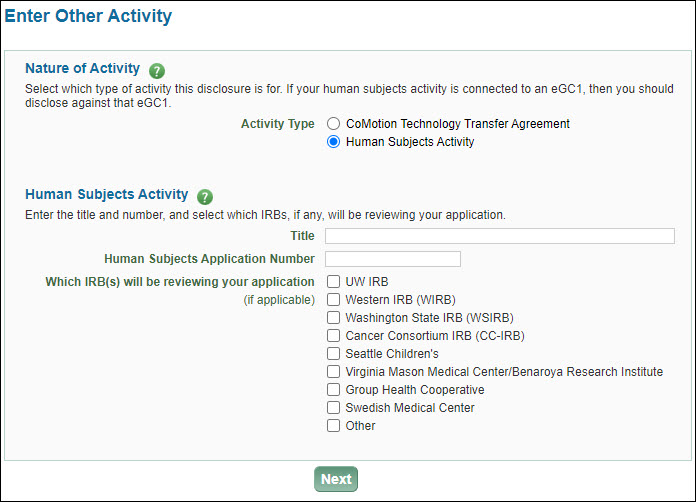
If you select Human Subjects Activity, additional fields will display.
- Enter the title and number of your Human Subjects Application.
- Select which Institutional Review Boards (IRB) will be reviewing your application.
- If you select Other, type in the name of the IRB.
- Click Next.
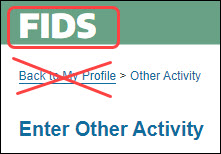
Note: If your human subjects activity is connected to an eGC1, then you should disclose against that eGC1. Click on “FIDS” in the green banner to exit out of this page and return to your Profile page. From there, you can re-start your disclosure and choose the appropriate eGC1.
The following image shows the Human Subjects Activity fields.
For either type of disclosure, after clicking Next, follow the instructions for disclosing Significant Financial Interests.
Caution: If you select an activity type, enter in the information, and use the breadcrumb navigation, you will create a pending disclosure. If you do not want to create a disclosure, click on “FIDS” in the green banner, as shown in the following image.