History & Comments
The History & Comments page provides an overview of all actions related to approvals, from when the application is first completed to when it is approved by OSP, including withdrawals, returns and re-completions. For Grant Runner and Adobe package applications, submission status information is also displayed here.
This page also displays any comments previously entered by campus reviewers or OSP when processing the application. Comments are:
- optional when you or another reviewer approve an application*
- optional when a preparer re-completes an application*
- required when you or another reviewer returns an application
- required when you add an ad hoc approver or watcher
*OSP’s business rule is to always give reviewer comments even when the system does not require them.
The system adds a standard comment when the preparer created the current eGC1 by copying another.
Notes:
- Comments entered by OSP when approving only appear on the OSP Notes and Status pages. A standard comment of “Approved by OSP” appears on the History & Comments page.
- All contents of the History & Comments page are visible to the owners of the application as well as OSP.
- To access the History & Comments page of an application, click History & Comments in the left-hand navigation menu.
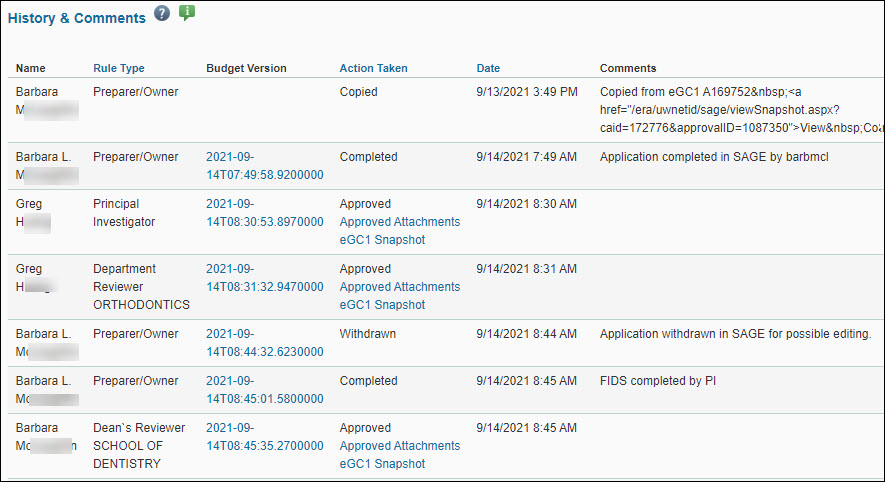
The History & Comments page lists completed actions and includes, reading from left to right:
- Name: the person taking the action
- Rule Type: the person’s relationship to the application
- Budget Version: if a budget is connected
- Action Taken: Completed, Withdrawn, Returned, Approved, Watched
- Date: when the action occurred
- Comments: included system-generated and user-entered comments
- For approvers, there are also links to Approved Attachments and an eGC1 Snapshot, to show the state of the application at the time of approval.
Note: If campus adds comments or details to the Additional Information section on the Certify & Route page of the eGC1, the system will add them as a Comment upon initial routing of the eGC1. Any edits to this field will not be tracked with an additional comment unless copied into the comments pop-up window upon routing. OSP can track any edits to this field within the eGC1 Campus Comments section of the Control Sheet, but there will be no alert for any edits made.
The following image shows an example of this page.
For Grant Runner applications, there is also a link to Approved Sponsor Forms.

Upcoming Approvals lists the units or reviewers who have not yet approved (or watched), their approval status, and a link to view the list of authorized reviewers for that unit.
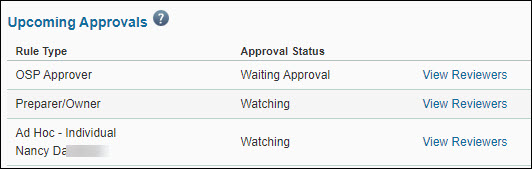
Possible approval statuses are:
- Waiting Approval indicates the eGC1 is ready for this Reviewer to approve.
- En Route indicates a prior Reviewer on the graph (to the left) has yet to approve.
- Watching indicates a reviewer who is not required to approve the eGC1, but who may need to review it.