December 18, 2025
December 18, 2025 SAGE Release Notes
The following message was sent to the MRAM and SAGE user lists on Thursday, December 18.
This evening, SAGE released new budget functionality: the ability to connect a SAGE Budget to a Modification Request (MOD). eGC1 non-fiscal compliance questions were also updated.
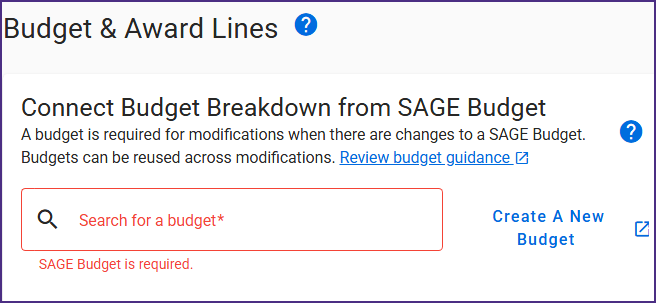
MOD Budget Connection
How do I connect a budget to a MOD?
Review MOD Budget & Award Lines for step-by-step instructions.
The experience is similar to connecting a budget to an Award Setup Request (ASR). MOD preparers no longer need to include budget snapshot URLs in MOD comments.
- Select the appropriate subcategories and determine if the MOD requires a budget.
- Create a new budget or update an existing budget.
- Search for and select a budget. You may search by budget title, PI last name, or budget number. If a budget is always required for your selected subcategories, you will be alerted.
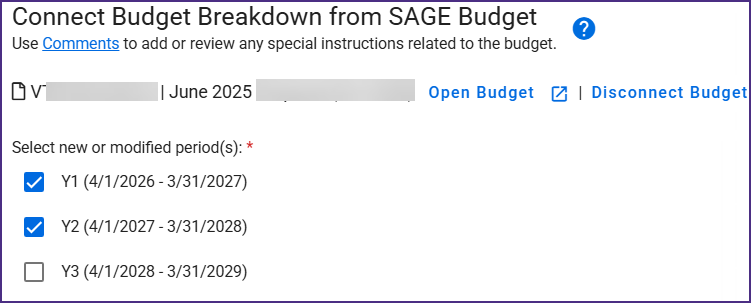
- Select the applicable periods. Unlike ASRs, MOD Budgets will not yet show a preview of the award lines. This is planned work for a future release.
Which MODs require a connected budget?
Whether a budget is required for a MOD is based on the subcategories selected. Review MOD Budget & Award Lines for detailed guidance.
Do MODs in process require a budget?
- MODs with “OSP Assigned” or “GCA Assigned” status: These MODs will be processed by OSP and/or GCA. However, if they include subcategories that require a budget and are returned to campus, the MOD will then need a connected budget.
- MODs returned from OSP or GCA to campus users: Returned MODs may require a connected budget depending on the subcategories selected.
Can I connect multiple MODs to the same budget?
Yes. Unlike ASRs, a single SAGE Budget can be connected to multiple MODs if the award is the same. A budget connected to an eGC1 (proposal budget) cannot be connected to a MOD.
Where can I find help with setting up my MOD?
- MOD Budget & Award Lines: This SAGE documentation page goes through each step of the budget connection process.
- Award Changes: Guidance and instructions for requesting OSP & GCA MODs.
- GCA Only Modifications: Guidance and instructions for GCA Only MODs.
- SAGE Support: Reach out via sagehelp@uw.edu or schedule a Teams appointment for help setting up and connecting your budgets.
eGC1 Non-Fiscal Compliance Updates
The Equipment & Materials and Data & Technology eGC1 non-fiscal compliance questions were also updated last night. Review the linked documentation for new question wording.
Campus users will be required to answer the updated questions for all newly created eGC1s, along with previously created eGC1s in Composing, Returned, and Withdrawn status. eGC1s with other statuses will not require answers to the updated questions unless returned to campus.
Review Compliance for Proposals and Agreements and Classified or Restricted Research for guidance on responding to the updated compliance questions.
Please reach out to sagehelp@uw.edu if you have any questions or concerns.