MOD Budget & Award Lines
Connect Budget Breakdown from SAGE Budget
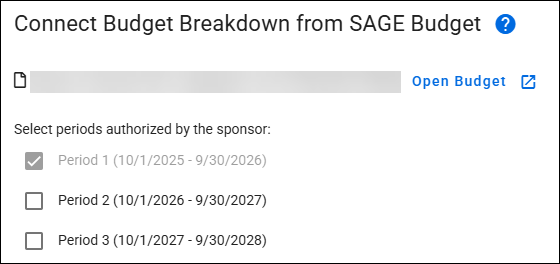
The first portion of the Budget & Awards form section displays the Budget Breakdown from the connected SAGE Budget. It contains the following information:
- Budget Name
- Budget Number
- Open Budget button
- This opens the connected SAGE Budget in a new browser tab
- A list of the Period(s) connected with start date and end date.
The following image shows the Connect Budget Breakdown from SAGE Budget portion of the Budget & Award Lines form section, with multiple periods.
Award Budget by Period
The Award Budget By Period portion of the Budget & Award Lines form section includes a tab for each period selected, with its description, and an “All Periods” tab on the left if more than one period was selected.

To the right of the section are three buttons:
- Expand Budget: opens the Award Line Details sections for the entire budget.
- Collapse Budget: closes the Award Line Details sections for the entire budget.
- Customize Details View: allows you to customize your view of budget data by toggling Object Class Details and Award Line Details on or off. Whichever setting is applied in the Budget and Award Lines section is also displayed in the Review section.
The following image shows these buttons with the Customize Details View expanded:

As you scroll down to view the details of your budget, these buttons continue to be visible.
The following image shows an All Periods un-expanded view with one award line:
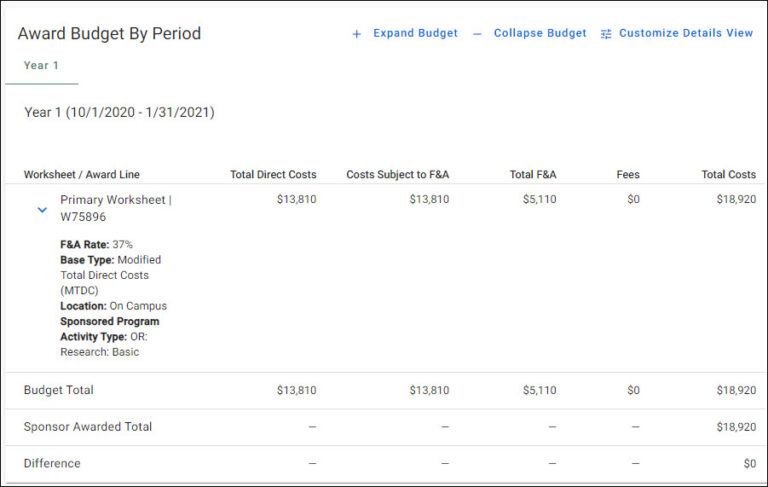
The first row is the Primary Worksheet.
The first column, Worksheet / Award Line, displays the following information:
- Worksheet Title
- F&A Rate
- Base Type
- Location
- Sponsored Program Activity Type
Select the blue caret (>) to the left of the Grant Number to open the Award Line Details section for an individual award line.
The remaining columns display the costs for that category:
- Total Direct Costs
- Costs Subject to F&A
- Total F&A
- Fees
- Total Costs
For the All Periods view, there are rows for Budget Total, Sponsor Awarded Total, and Difference. The Difference is between the Budget Total Costs and the Sponsor Awarded Total. For a single Period, there is a Period Total row.
Object Class and Spend Category Details
This section displays when the Expand Budget button is selected. It shows a breakdown of the MOD’s linked budget amounts by the categories needed for the Workday plan setup. The amounts are aggregated by Ledger, Object Class, and Spend Category for each award line and period.
The following image shows an example of this section:

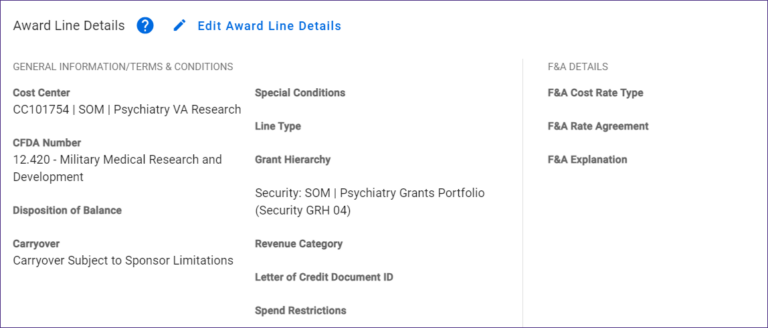
Award Line Details
General Information/Terms & Conditions
- Carryover
- CFDA Number
- Cost Center
- Disposition of Balance
- Letter of Credit Document ID
- Line Type
- Grant Hierarchy
- Revenue Category
- Special Conditions
- Salary Cap
- Spend Restrictions
- Sponsored Program Activity Type
F&A Details
- F&A Cost Rate Type
- Search by % or Activity Location.
- When a value is entered, the expected Rate Agreement base type will display.
- F&A Rate Agreement
- Reference the Cost Rate Type field for the associated F&A Rate Agreement.
- F&A Explanation
The following image shows the Award Line Details.
Edit Award Line Details
Click on the link to open a side panel. From here you can update the values. Clicking in the main section of the page closes the side panel.
The following images show the panel.
