Equal Access: Universal Design of Instruction

The universal design of instruction (UDI) framework is gaining increased attention and application by educational researchers and practitioners at K-12 and postsecondary levels. UDI means that, rather than designing for the average student, you design instruction for potential students who have broad ranges with respect to ability, disability, age, reading level, learning style, native language, race, and ethnicity. Regarding students with disabilities, UDI challenges the instructor to go beyond legal compliance to proactively make all aspects of instruction, including class climate, interaction, physical environments and products, delivery methods, information resources and technology, feedback, and assessment.
Components of the UDI Framework include scope, definition, process, principles, guidelines, and practices. You can flesh out this framework to build a toolkit for applying UDI. The scope of UDI comprises all facilities, curricula, pedagogies, activities, and technologies used to help students learn.
UDI Definition
A definition that can be used for the application of the UDI, modified from the basic definition of UD, is the design of teaching and learning products and environments “to be usable by all people, to the greatest extent possible, without the need for adaptation or specialized design.”
UDI Process
To apply UDI, instructors should consider the potential variation in individual skills, learning styles and preferences, age, gender, sexual orientation, culture, abilities, and disabilities as they select appropriate content and strategies for the delivery of instruction and then apply universal design to all course activities and resources. Specifically, an instructor needs to
-
Identify the course and evidence-based teaching practices. Describe the course, learning objectives, and content. Adopt overall teaching and learning philosophies (e.g., constructivism) and evidence- based practices (e.g., active learning).
-
Consider the diverse characteristics of potential students. Describe the population of students eligible to enroll in the course and then consider their potential diverse characteristics—with respect to gender; age; ethnicity; race; native language; learning preferences; size; abilities to see, hear, walk, manipulate objects, read, speak—and the challenges they might encounter in your course.
-
Integrate UDI with evidence-based teaching practices. Apply UDI strategies (underpinned by relevant UDHE principles) in concert with evidence- based instructional practices in the choice of teaching methods, curricula, and assessments as well as to all teaching practices and materials to maximize the learning of students with diverse characteristics.
-
Plan for accommodations. Learn campus procedures for addressing accommodation requests (e.g., arranging for sign language interpreters) from specific students for whom the course design does not already provide full access. Include information about how students can request accommodations in the syllabus.
-
Evaluate. Monitor the effectiveness of instruction through observation and assessments of learning and collect formative feedback from students. Make modifications based on the results. Return to step 3 if your evaluation suggests further improvements to your course should be made.
UDI Principles and Practices
The Principles of UD, developed by the Center for Universal Design, encourage the development of products and environments that promote (1) equitable use, (2) flexibility in use, (3) simple and intuitive use, (4) perceptible information, (5) tolerance for error, (6) low physical effort, and (7) size and space for approach and use. A related, but more specific application, Universal Design for Learning (UDL), provides “a framework for designing curricula that enable all individuals to gain knowledge, skills, and enthusiasm for learning. UDL provides rich supports for learning and reduces barriers to the curriculum while maintaining high achievement standards for all.” UDL guidelines, developed by CAST, promote the development of curriculum that includes (1) multiple means of representation, (2) multiple means of action and expression, and (3) multiple means of engagement. The Web Content Accessibility Guidelines (WCAG) can be used to ensure that IT used for instructional practice is accessible and usable for students with disabilities. They are supported by a foundation of four principles that result in IT that is perceivable, operable, understandable, and robust.
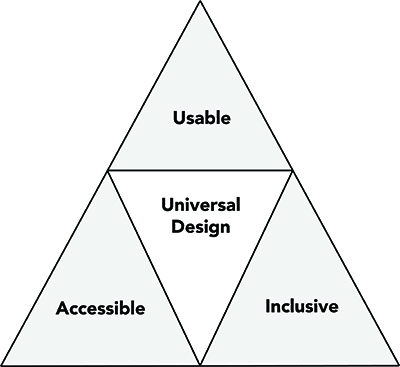
UDI embraces UD, UDL, WCAG principles and applies them to all aspects of instruction, including physical spaces, pedagogy, and IT and ensures each UDI practice is accessible, usable and inclusive.
UDI Practices
The following checklist provides examples of UDI practices. Numbers in brackets at the end of items in the checklist refer to UD, UDL, and WCAG principles to which the practice is most relevant.
Class Climate
Adopt practices that reflect high values with respect to diversity, equity, and inclusion.
-
Welcome everyone. Create a welcoming environment for all students. Learn students’ names. Build rapport. Encourage the sharing of multiple perspectives. Demonstrate and demand mutual respect. Include a civility statement with behavioral expectations in the syllabus. [UD 1; UDL 3]
-
Avoid stereotyping. Offer instruction and support based on student performance and requests, not simply on assumptions that members of certain groups (e.g., students with certain types of disabilities or from specific racial or ethnic groups) will automatically do well or poorly or require certain types of assistance. [UD 1]
-
Be approachable and available. Welcome questions, seek out a student’s point of view, and respond patiently. Encourage students to meet with you, maintain regular office hours, and suggest alternatives when student schedules conflict with those hours. [UD 1, 5; UDL 3]
-
Motivate all students. Use teaching methods and materials that are motivating and relevant to students with diverse characteristics, such as age, gender, cultures, and interests. [UD 1; UDL 3]
-
Address individual needs in an inclusive manner. Both on the syllabus and in class, invite students to meet with you to discuss disability-related accommodations and other learning needs.
-
On the syllabus, list URLs and other contact information for tutoring and writing centers, disability services, and other campus services that may be helpful. [UD 1, 2; UDL 1]
-
Avoid segregating or stigmatizing any student. Do not draw undue attention to a difference (e.g., disability) or share private information (e.g., a specific student’s accommodation). [UD 1; UDL 2, 3]
Interaction
Encourage regular and effective interactions between students and the instructor, employ multiple communication methods, and ensure that communication methods are accessible to all participants.
-
Offer multiple options for communication and collaboration. Employ interactive teaching techniques. Use in-person, phone, and multiple electronic communication methods when possible. Make interactions accessible to all participants, including those with disabilities. When meeting on site, face the class, speak clearly, consider using a microphone, and make eye contact with students. [UD 1, 2, 4, 5; UDL 2, 3; WCAG]
-
Require inclusive cooperative learning. Assign group work for which learners must engage using a variety of skills and roles. Encourage different ways for group members to interact with each other, insist that all students participate, and facilitate their engagement as needed to ensure that participants communicate in ways that are accessible to and inclusive of all group members. [UD 1, 2, 4, 5; UDL 3; WCAG]
Physical Environments and Products
For on-site instruction ensure that facilities, activities, materials, and equipment are physically accessible to and usable by all students and that diverse student characteristics are addressed in safety considerations.
-
Ensure physical access to facilities. Use classrooms, labs, workspaces, and fieldwork sites that are accessible to individuals with a wide range of physical abilities. [UD 6, 7; UDL 1, 3]
-
Arrange instructional spaces to maximize inclusion and comfort. Position chairs to encourage participation and give each student a clear line of sight to the instructor and visual aids. Allow room for wheelchairs, personal assistants, sign language interpreters, and captionists. Minimize distractions (e.g., put small groups in quiet work areas). Encourage administrators to routinely apply UD principles in the design of facilities and renovations. [UD 2, 6, 7; UDL 1, 3]
-
Ensure that everyone can use equipment and materials. Minimize nonessential physical effort. Provide options for operation of equipment, handles, locks, cabinets, and drawers from different heights, with different physical abilities, and by using a right or left hand. Use large print to label controls on lab equipment and other educational aids, using symbols as well as words. Provide straightforward spoken and printed directions for operation. [UD 3–7; UDL 2; WCAG]
-
Ensure safety. Consider potential issues for people with specific disabilities in emergency situations. Develop procedures for all potential students, including those who are blind, deaf,
or wheelchair users. Label safety equipment in simple terms, in large print, and in a location viewable from a variety of angles. Provide spoken and printed safety instructions. [UD 3, 4, 6, 7]
Delivery Methods
Use multiple instructional methods that are accessible to all learners.
-
Make content relevant. Put learning in context. Incorporate multiple examples and perspectives to make specific concepts relevant to individuals with diverse characteristics such as age, ability, gender, ethnicity, race, socioeconomic status, and interests. [UD 1; UDL 1, 3]
-
Select flexible curriculum. Choose textbooks and other curriculum materials that address the needs of students with diverse abilities, interests, and learning preferences; are well organized; emphasize important points; provide references for gaining background knowledge; include indices and glossaries; and have chapter outlines, study questions, and practice exercises. Consider the use of digital materials that provide feedback, background information, vocabulary, and other supports based on student responses. [UD 2–5; UDL 1, 3; WCAG]
-
Provide cognitive supports. Summarize major points; give background and contextual information and deliver effective prompting. Offer outlines, summaries, graphic organizers, and other scaffolding tools to help students learn. Provide options for gaining background information, and vocabulary. At the beginning of a lesson, consider posing one or two questions and ask students to answer them at the end of the session. [UD 2–5; UDL 1–3; WCAG]
-
Provide multiple ways to learn. Use multiple modes to deliver content e.g., reading, lectures, collaborative learning, small group discussions, hands-on activities, internet simulations, and fieldwork). [UD 2–4; UDL 1, 2; WCAG]
-
Deliver instructions clearly and in multiple ways. Make instructions clear in the syllabus and follow up with a question and answer session. Ask students to summarize instructions to ensure understanding. [UD 3, 4; UDL 1; WCAG]
-
Use large visual and tactile aids. Use large manipulatives and images to demonstrate content; use a computer to enlarge microscope images. [UD 3, 4; UDL 1; WCAG]
-
Make each teaching method accessible to all students. Consider a wide range of abilities, interests, learning styles, and experiences when implementing each instructional method to ensure engagement of all students. Describe content presented visually. [UD 2, 4, 5; UDL 1, 2; WCAG]
Information Resources and Technology
Ensure that course materials, notes, and other information resources are engaging, flexible, and accessible for all students.
- Select materials early. Choose materials and prepare a syllabus early to allow students the option of beginning to read materials and work on assignments before the course begins and time to arrange for alternative formats. [UD 4; UDL 1; WCAG]
- Provide content in accessible, universally designed formats. Select or create materials (including textbooks, syllabi, lesson pages, presentation materials) that are universally designed. For example, use electronic materials that are text-based, have flexible features, use formatted headings and lists, describe content within images, have consistent layouts and organization schemes, whose link text describes its destination, use large sans serif fonts on uncluttered pages with plain backgrounds, and incorporate color combinations that are high contrast and can be distinguished by people with color blindness. Use captioned videos and provide transcriptions for audio presentations. Apply accessibility standards to websites. [UD 4; UDL 1; WCAG]
- Accommodate a variety of reading and technology, skills. Present content in a logical, straightforward manner and in an order that reflects its importance. Avoid unnecessary jargon and complexity and define new terms when they are presented. Create materials in simple, intuitive formats. Provide options for gaining the technology skills needed for course participation. Share relevant campus resources with students. [UD 3, 4; UDL 1]
- Ensure the availability of appropriate assistive technology. If computer or science labs are used, ensure that assistive technology for students with disabilities is available or can be readily acquired. [UD 2, 4, 6, 7; UDL 1, 2; WCAG]
Feedback and Assessment
Regularly assess students’ progress, provide specific feedback on a regular basis using multiple accessible methods and tools, and adjust instruction accordingly.
-
Set clear expectations. Keep academic standards consistent for all students, including those who require accommodations. Provide clear statements of expectations for the course, individual assignments, deadlines, and assessment methods. Include straightforward grading rubrics for assignments. [UD 3; UDL 3]
-
Test in the same manner in which you teach. Ensure that a test measures what students have learned and not their ability to adapt to a new format or style of presentation. [UD 3; WCAG]
-
Minimize time constraints when appropriate. Plan for variety in the ability of students to complete work by describing assignments well in advance of due dates, ideally in the syllabus. Allow extended time on tests, unless speed is an essential course objective. [UD 2, 3]
-
Offer regular feedback and corrective opportunities. Allow students to turn in parts of large projects for feedback before the final project is due. Give students resubmission options to correct errors in assignments and exams. Arrange for peer feedback when appropriate. [UD 5; UDL 2, 3]
-
Provide multiple ways for students to demonstrate what they have learned. Assess group and cooperative performance, as well as individual achievement. Consider using traditional tests with a variety of item types (e.g., multiple choice, essay, short answer), group work, demonstrations, portfolios, term papers, and presentations as options for demonstrating knowledge. Provide students choices in assessment methods when appropriate. [UD 2, 4; UDL 3; WCAG]
-
Monitor and adjust. Regularly assess students’ background knowledge and current learning informally (e.g., through class discussions) and formally (e.g., through frequent, short exams), and adjust instructional content and methods accordingly. [UD 5]
-
Provide sample test questions, exemplary work, and study guides. Consider sharing sample test questions with answers and exemplary work of previous students, discussing how to study for course exams, and providing study guides. [UD 3; UDL 3; WCAG]
Accommodations
Plan for accommodations for students whose needs are not fully met by the instructional content and practices.
-
Know how to arrange for accommodations. Learn campus protocols for getting materials in alternate formats, captioning videos, and arranging for other accommodations for students with disabilities. [UD 1, 2, 4, 6]
-
Share accommodation information. Tell how to arrange accommodations on the syllabus. Tell teaching and lab assistants about student accommodations. [UD 1; UDL 2, 3]
Checklist Updates and Resources
This checklist was field tested at more than twenty postsecondary institutions nationwide. To increase the usefulness of this working document, send suggestions to doit@uw.edu.
A video titled Equal Access: Universal Design of Instruction is available online. For more information and resources regarding applications of UD to education, and checklists for making a tutoring and learning center or other services accessible to students with disabilities, consult The Center for Universal Design in Education website. The book Universal Design in Higher Education: From Principles to Practice, Second Edition published by Harvard Education Press; offers perspectives from UD leaders nationwide. To learn more and order online visit the DO-IT website.
Communication Hints
Treat people with disabilities with the same respect and consideration with which you treat others. Here are some helpful hints when it comes to delivering a presentation, hosting an exhibit, and otherwise relating to people with disabilities.
General
- Ask a person with a disability if that person needs help before providing assistance.
- Talk directly to the person with a disability, not through their companion or interpreter.
- Refer to a person’s disability only if it is relevant to the conversation.
- Avoid derogatory slang or negative descriptions of a person’s disability. For example, “a person who uses a wheelchair” is more appropriate than “a person confined to a wheelchair.” A wheelchair is not confining—it’s liberating!
- Provide information in alternate means (e.g., written, spoken, diagrams).
- Do not interact with a person’s guide dog or service dog unless you have received permission to do so.
- Do not be afraid to use common terms and phrases, like “see you later” or “let’s go for a walk” around people with disabilities.
- Do not touch mobility devices or assistive technology without the owner’s consent.
- Do not assume physical contact—like handshakes, high-fives, or hugs—is okay.
- Understand that not everyone uses eye contact.
Blind or Low Vision
- Be descriptive. Say, “The computer is about three feet to your left,” rather than “The computer is over there.”
- Speak all of the projected content when presenting and describe the content of charts, graphs, and pictures.
- When guiding people with visual impairments, offer them your arm rather than grabbing or pushing them.
Learning Disabilities
- Offer directions or instructions both orally and in writing. If asked, read instructions to individuals who have specific learning disabilities.
Mobility Impairments
- Consider carrying on a long conversation with an individual who has a mobility impairment from a seated position.
Speech Impairments
- Listen carefully. Repeat what you think you understand and then ask the person with a speech impairment to clarify or repeat the portion that you did not understand.
Deaf or Hard of Hearing
- Face people with hearing impairments, and avoid covering your mouth, so they can see your lips. Avoid talking while chewing gum or eating.
- Speak clearly at a normal volume. Speak louder only if requested.
- Repeat questions from audience members.
- Use paper and pencil, or type things out on your cell phone, if the person who is deaf does not read lips or if more accurate communication is needed.
- When using an interpreter, speak directly to the person who is deaf; when an interpreter voices what a person who is deaf signs, look at the person who is deaf, not the interpreter.
Psychiatric Impairments
- Provide information in clear, calm, respectful tones.
- Allow opportunities for addressing specific questions.
About DO-IT
DO-IT (Disabilities, Opportunities, Internetworking, and Technology) serves to increase the successful participation of individuals with disabilities in challenging academic programs and careers. Primary funding for DO-IT is provided by the National Science Foundation, the State of Washington, and the U.S. Department of Education.
Acknowledgment
The Center for Universal Design in Education as well as this publication are based on work supported by the U.S. Department of Education (Grant #P33A020042, #P333A020044, #P333A050064). However, the contents do not necessarily represent the policy of the Department of Education, and you should not assume its endorsement.
For further information, to be placed on the DO-IT mailing list, or to request materials in an alternate format, contact:
DO-IT
University of Washington
Box 354842
Seattle, WA 98195-4842
doit@uw.edu
www.uw.edu/doit/
206-685-DOIT (3648) (voice/TTY)
888-972-DOIT (3648) (toll free voice/TTY)
509-328-9331 (voice/TTY) Spokane
206-221-4171 (FAX)
Founder and Director: Sheryl Burgstahler, Ph.D.
Copyright © 2020, 2017, 2015, 2013, 2012, 2011, 2010, 2009, and 2008, University of Washington. Permission is granted to copy these materials for educational, noncommercial purposes provided the source is acknowledged.