Equal Access: Universal Design of Physical Spaces

As increasing numbers of people with disabilities pursue educational opportunities at all levels, the accessibility of campus facilities and physical spaces increases in importance. The goal is simply equal access; everyone who visits your campus should be able to do so comfortably and efficiently.
Legal Issues
The Architectural Barriers Act of 1968 requires that “buildings and facilities that are designed, constructed, or altered with Federal funds, or leased by a Federal agency, comply with Federal standards for physical accessibility” (United States Department of Justice, 2005, p. 19).
Section 504 of the Rehabilitation Act of 1973, the Americans with Disabilities Act of 1990, and its 2008 amendments prohibit discrimination against individuals with disabilities. According to these laws, no otherwise qualified person with a disability shall, solely by reason of his or her disability, be excluded from the participation in, be denied the benefits of, or be subjected to discrimination under any program or activity of a public entity. Ideally, physical spaces should be designed to be accessible to students with disabilities.
Universal Design
To make your department or institution welcoming and accessible to everyone, employ principles of universal design (UD). Universal design means that rather than designing your facility and services for the average user, you design for people with a broad range of abilities, ages, reading levels, learning styles, languages, cultures, and other characteristics. Keep in mind that students, staff, faculty, and visitors may have characteristics that are not defined as disabilities, but may limit their ability to access physical spaces or information. These people could be short, tall, poor readers, left-handed, or speak a different language. Preparing your campus to
be accessible to them will make it more usable by everyone and minimize the need for special accommodations. Make sure everyone
- feels welcome,
- can get to facilities and maneuver within them,
- is able to fully benefit from resources and courses, and
- can make use of equipment and software.
Besides the basic principles of UD, to ensure IT used in the space and instructional practices are inclusive of all space users, apply principles that underpin the Web Content Accessibility Guidelines (WCAG) and the Universal Design for Learning (UDL), respectively. See the publication Universal Design in Education: Principles and Applications.
A Process for Universal Design
Key considerations to address when applying UD to a physical space at an institution of higher education are to plan ahead and to keep in mind the diversity of the campus community at all stages of a project. The following steps outline
a process for the application of UD to physical spaces.
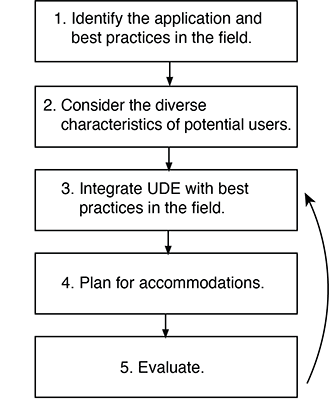
- Identify the space and best practices in the field. Specify the space to which you wish to apply universal design in higher education (UDHE; e.g., a student union building). Review research and practices to identify best practices within the field of the application (e.g., the design of student service buildings).
- Consider the diverse characteristics of potential users. Describe the potential faculty, students, staff, and visitors who might use the space and the diverse characteristics of the population (e.g., with respect to gender; age; size; ethnicity and race; native language; learning preferences; and abilities to see, hear, manipulate objects, read, and communicate).
- Integrate UDHE with best practices in the field of campus space design. Integrate UDHE practices (underpinned by relevant UD, UDL, and WCAG principles) with best practices within the field of design of the type of space (e.g., design practices for student union buildings) to maximize the benefit of the space to individuals with a wide variety of characteristics.
- Plan for accommodations. Develop processes to address accommodations for individuals for whom the design of the space does not automatically provide access (e.g., ensuring that cafeteria staff know how to assist customers with disabilities). Tell potential users of the space how to request accommodations within signage, websites, and publications.
- Evaluate. Once the space is completed, collect feedback from individuals with diverse characteristics who use the space (e.g., through online surveys, focus groups). Make modifications based on the results. Return to step 3 if evidence from your evaluation suggests that improvements should be made to your design.
Practices for All Spaces
Following are examples within categories where universal design can be applied to a physical space at your institution. This content does not provide legal advice. To help clarify legal issues, consult your campus legal counsel or ADA/504 compliance officer or call your regional Office for Civil Rights (OCR).
Planning, Policies, and Evaluation
Consider diversity issues as you plan and evaluate the space.
- Do you have policies and procedures that ensure access to facilities, printed materials, computers, and electronic resources for people with disabilities?
- Are people with diverse characteristics, including various types of disabilities, included in the planning process?
- Is accessibility considered in the development process?
- Are accessibility issues integrated into the procurement process?
- Do you have a procedure to ensure a timely response to requests for disability-related accommodations?
- Are disability-related access issues addressed in your evaluation methods?
Appearance
Design the space to foster a campus climate that is inclusive of all students, staff, faculty, and visitors.
- Is the environment appealing and welcoming to those with a variety of cultural backgrounds, ages, abilities, and other characteristics?
Entrances, and Routes of Travel
Make physical access welcoming and accessible to people with a variety of abilities, sizes, and ages.
- Are there convenient, wheelchair-accessible parking spaces and routes of travel to facilities and within facilities?
- Are entryways sheltered?
- Are outdoor lights with motion sensors installed near entrances?
- Do sensors automatically open exterior doors?
- Are lever handles installed rather than knobs on doors that do not automatically open?
- Are paths flat or gently sloping so that everyone can travel the same route?
- Are there are ample high-contrast, large- print directional signs to and throughout the physical space?
- Are all aisles wide and clear of obstructions?
- Are electrical outlets and light switches positioned so that they can be reached from both standing and sitting positions?
- Is lighting for individual work areas adjustable by facility users?
Consult the ADA Checklist for Readily Achievable Barrier Removal for more suggestions. For computing facilities, consult Equal Access: Universal Design of Computer Labs video and publication.
Fixtures and Furniture
Provide fixtures, furniture and equipment that can be used by potential facility users with diverse characteristics.
- Are fixed or fold-down seats available in showers?
- Are levers instead of knobs installed for sink handles and cabinets?
- Are mirrors, sinks, and towel dispensers located so they are usable by individuals with a wide range of body sizes from standing or seated positions?
- Does equipment feature front-mounted, easy- to-operate controls, with instruction labels in large, high-contrast print?
- Are work surfaces adjustable in height and do they allow flexible arrangements for different learning activities and student groupings?
- Are mirrors mounted above locations where demonstrations are typically given?
- Are UD features prioritized when selecting equipment and other products used in the facility?
Information Resources and Technology
Ensure that information and technology is accessible to everyone.
- Are publications positioned to allow access from seated and standing positions?
- Is all IT used within or associated with the facility accessibly designed?
- Are directional and information kiosks reachable from standing and seated positions?
- Do vendors provide accessibility features (e.g., captioned video, compatibility with assistive technology) in computers and software?
- Are adjustable-height tables used at each type of workstation to assist students who use wheelchairs or are small or large in stature?
- Is adequate work space provided for both left-and right-handed users?
- For those who have difficulty controlling a mouse, are trackballs available?
- Are staff members aware of accessibility options (e.g., enlarged text feature) included in computer operating systems and of assistive technology available in the facility?
- Have procedures been put in place for a timely response to requests for assistive technology?
Note that your organization need not have special technology on hand for every type of disability but should have available assistive technology that can benefit many people. For more information about assistive technology consult the videos and publications.
Safety
Design the space to minimize the risk of injury.
- Are nonslip walking surfaces used?
- Do the installed emergency systems incorporate audio and visual warnings?
Accommodation
Develop a system for staff to address accommodation requests by individuals for whom the space design does not automatically provide access.
- Are procedures in place for requesting disability-related accommodations in signage, publications and websites?
- Do facility staff members know how to respond to requests for disability-related accommodations?
Checklist Updates
To increase the usefulness of this working document, send suggestions to doit@uw.edu.
Additional Resources
An electronic copy of the most current version of this publication as well as additional useful brochures can be found here. For more information about applications of universal design, consult The Center for Universal Design in Education. The book Universal Design in Higher Education: From Principles to Practice, Second Edition published by Harvard Education Press shares perspectives of UD leaders nationwide. To learn more or order online, visit the DO-IT website.
References
Burgstahler, S. (2015). Universal Design of Higher Education: From Principles to Practice, Second Edition. Boston: Harvard Education Press.
United States Department of Justice. (2005) A guide to disability rights laws. Washington, DC: U.S. Department of Justice Civil Rights Division.
About DO‑IT
DO‑IT (Disabilities, Opportunities, Internetworking, and Technology) serves to increase the success of individuals with disabilities in challenging academic programs and careers, such as those in science, engineering, mathematics, and technology. Primary funding for DO‑IT is provided by the National Science Foundation, the U.S. Department of Education, and the State of Washington.
For further information, to be placed on the DO‑IT mailing list, request materials in an alternate format, or to make comments or suggestions about DO-IT publications or web pages, contact:
DO‑IT
Box 354842
University of Washington
Seattle, WA 98195-4842
doit@uw.edu
www.uw.edu/doit/
206-685-DOIT (3648) (voice/TTY)
888-972-DOIT (3648) (toll free voice/TTY)
509-328-9331 (voice/TTY) Spokane
206-221-4171 (fax)
Founder and Director: Sheryl Burgstahler, Ph.D.
Acknowlegment
The contents of this brochure were developed under a grant from the U.S. Department of Education, #P333A050064. However, these contents do not necessarily reflect the policy of the U.S. Department of Education, and you should not assume endorsement by the federal government.
Copyright © 2017, 2012, 2010, 2009, 2008 University of Washington. Permission is granted to copy these materials for educational, noncommercial purposes provided the source is acknowledged.